Hiring Pipeline Board for Small Teams: Track Candidates, Then Onboard
Plan your hiring pipeline board the simple, visual way
Turn recruiting and first-week setup into a clear flow you can trust.
A candidate says, “I can do 4pm,” and you realize you never wrote down who is interviewing them.
Later, you’re trying to find the resume you saw yesterday, but it’s buried under three email replies.
Borddo gives you a candidate tracking board that works like a simple kanban.
Each candidate is a card you drag from Applied to Interview to Hired, with comments for quick interview notes and a resume attachment right on the card.
Once they accept, add onboarding subtasks like “create email account,” “order laptop,” and “schedule first 1:1” so onboarding feels organized without starting over.
You’ll feel the difference.
Why hiring and onboarding often feels overwhelming, and how Borddo makes it easier
Why a hiring pipeline board often feels messy, and how Borddo makes it easier
Hiring is rarely the only thing on your plate.
You’re squeezing it between customer work, meetings, and a hundred small decisions.
Two frustrations show up fast in a small team.
First, the stage gets fuzzy. Someone asks, “Are they still in screening or already in interviews?” and you have to piece it together from chat and email.
Second, notes scatter. You remember a great answer about handling tough customers, but it’s sitting in a notebook you left at home.
Then the hire says yes.
It’s exciting.
But onboarding turns into a new set of loose ends, like “Who’s creating the email?” and “Did we already share the handbook?”
Borddo brings it into one board you can actually keep up with.
Cards move through your stages, and the same card can hold onboarding subtasks once someone joins.
| Before Borddo | After Borddo |
|---|---|
| 📨 Following up twice because no one knows who replied last | 👀 A hiring pipeline board that shows every stage at a glance |
| 🔍 Searching for interview notes five minutes before the call | 📁 Interview notes and files kept with the candidate card |
| 📝 Starting onboarding with a sticky note list that disappears | 🚀 An onboarding checklist that starts the moment a card moves to Hired |
What this hiring + onboarding board looks like in Borddo
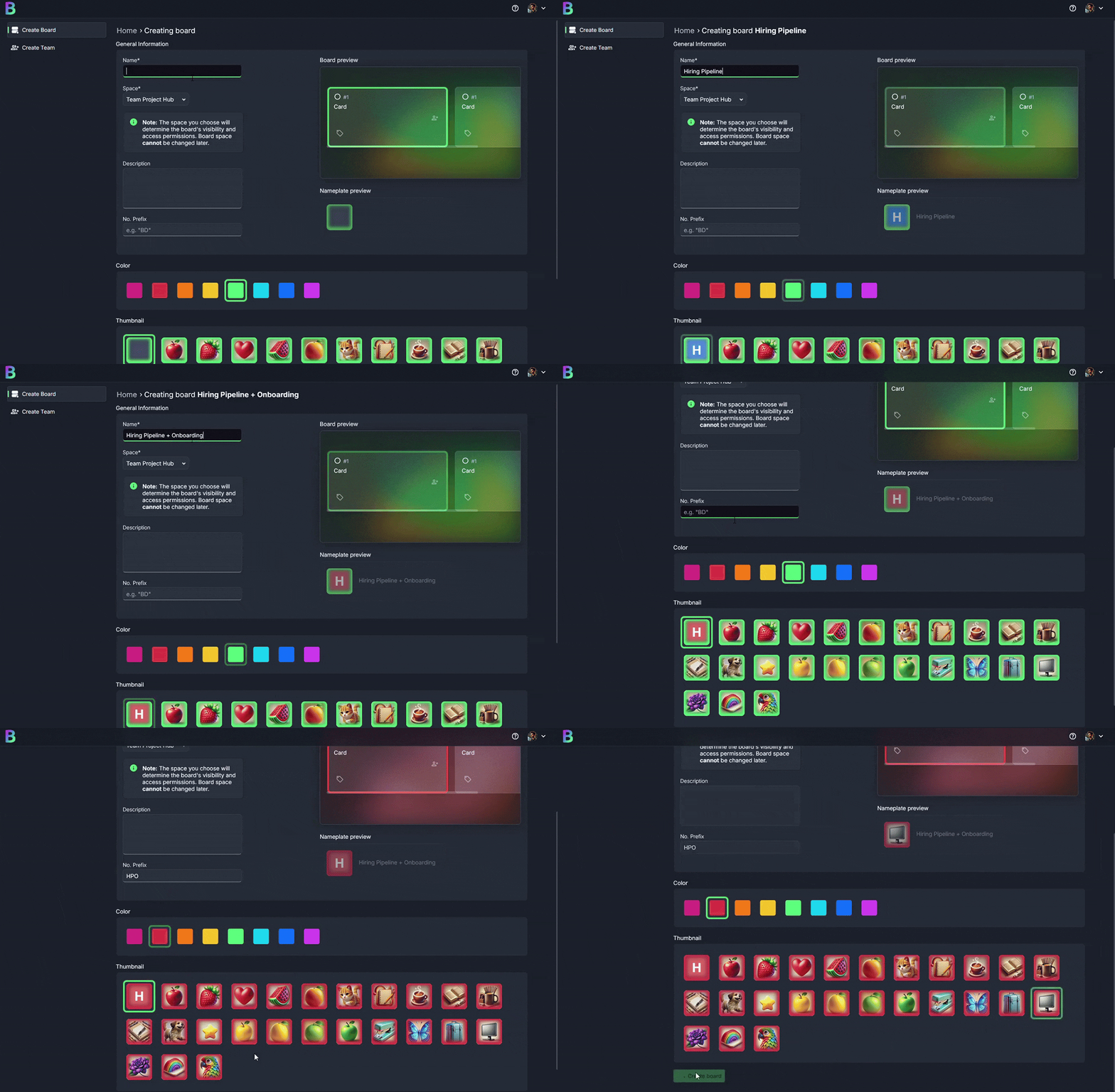
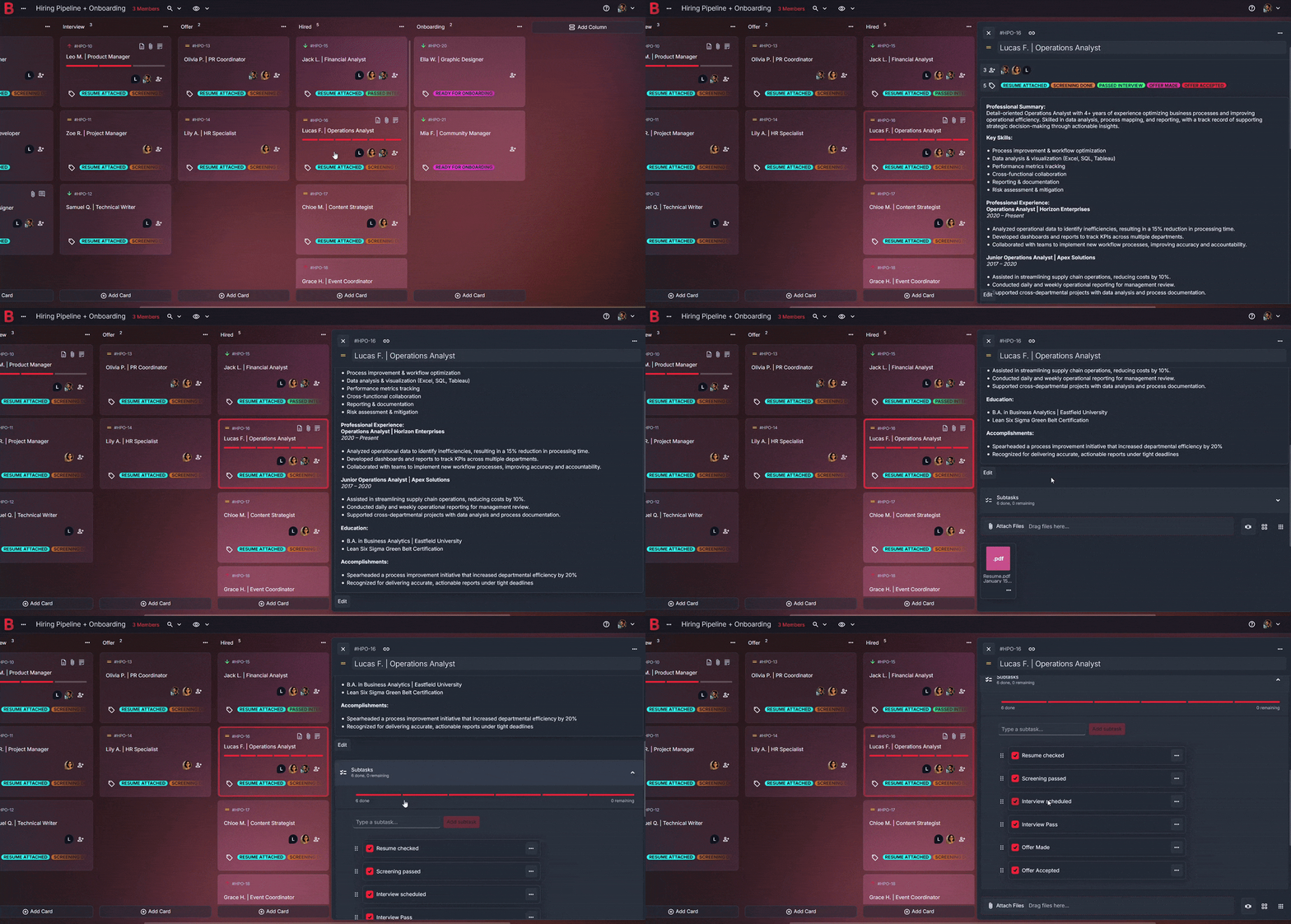
At the top, name the board something plain, like “Hiring Pipeline + Onboarding.”
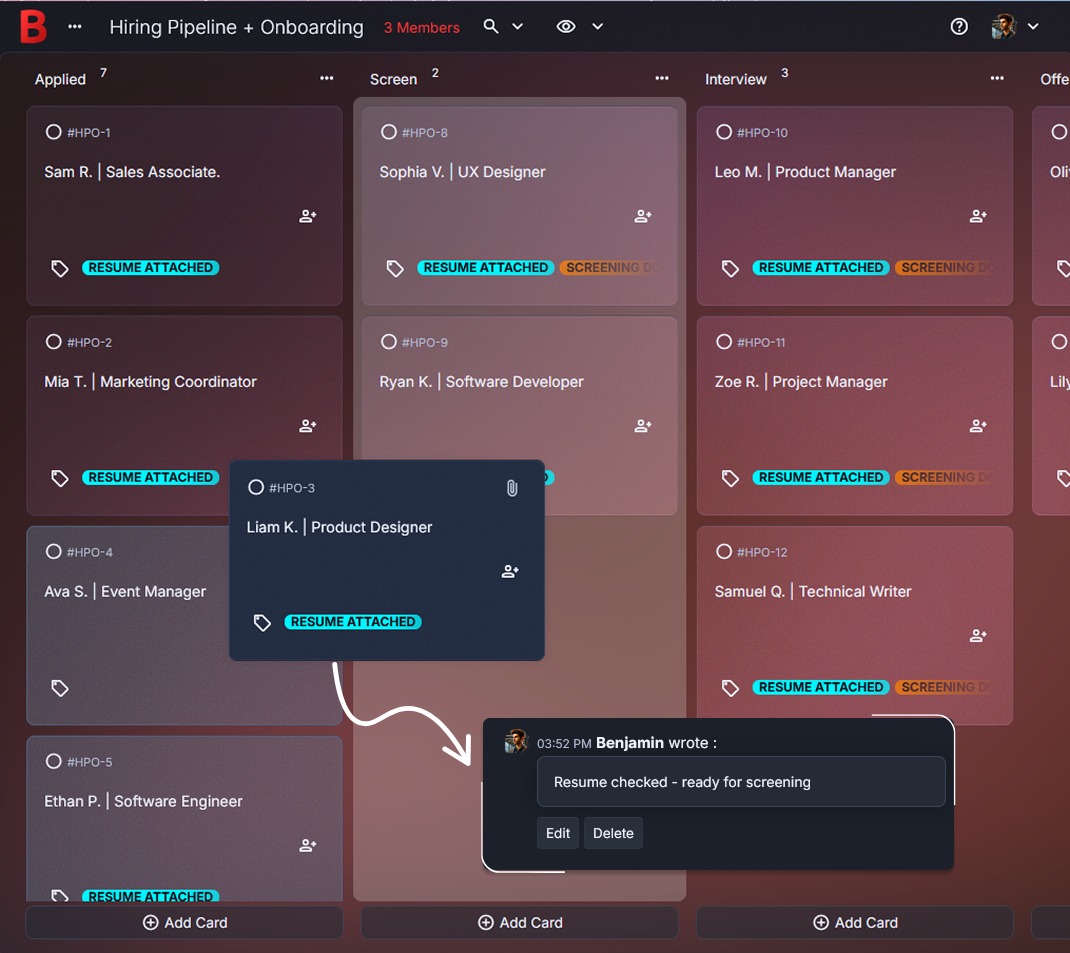
Below it, columns line up in a kanban-style flow: Applied, Screen, Interview, Offer, Hired, Onboarding.
In Applied, each card starts with the basics.
“Sam R. | Sales Associate.”
A resume PDF is attached, so you stop hunting for the right file.
Move that card to Screen, and you can add a quick note in comments right after the call.
One sentence is enough.
“Clear communicator, wants evening shifts.”
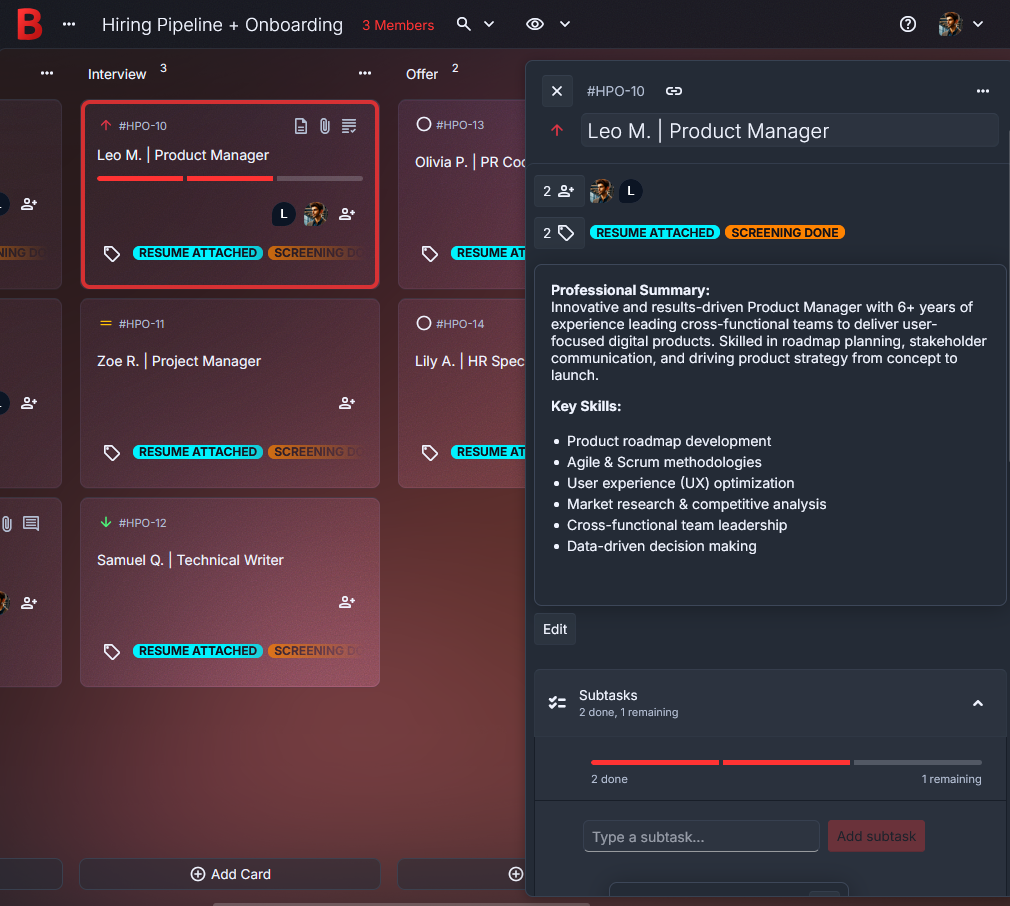
Interview is where details tend to get lost, so keep them inside the card.
Add a short checklist like “portfolio review,” “role-fit chat,” and “references.”
Tick items off as you go.
When you drag a card into Offer, make the next steps visible with 2–3 subtasks, like “draft offer,” “send,” and “confirm start date.”
Short and practical.
Finally, Hired and Onboarding become your onboarding checklist.
Inside the same card, add first-week subtasks like “create email account,” “invite to key boards,” and “schedule first 1:1.”
Done.
Create your hiring pipeline + onboarding board in just a few steps
1. Create a new board
Name it after the role or round, like “Hiring: Support Rep.”
Keep the title clear.
2. Add columns that match your flow
Start simple: Applied → Screen → Interview → Offer → Hired → Onboarding.
If Onboarding is empty, collapse it until the next hire.
3. Add a card for each candidate
Use “Name | Role” in the title.
Attach the resume right away, then add a portfolio link in the description if needed.
4. Add the details that prevent confusion later
Drop interview takeaways into comments while they’re still fresh.
Use tags for source, like Referral or Inbound.
Add a priority for roles you want to move quickly.
When someone accepts, turn the same card into an onboarding checklist by adding a few onboarding subtasks.
5. Move cards, then archive what you’re done with
Drag cards forward as you book next steps.
Archive closed candidates to keep the board clean.
It stays calm.
Keep hiring conversations clear for the whole team
Hiring gets confusing when updates live in private places.
One person remembers a concern. Another remembers a win.
A third person is just trying to figure out who is meeting the candidate today.
With Borddo, the board becomes a shared reference point.
Before an interview, someone can open the card and see what was already covered, plus the one question you still need answered.
Picture the moment you avoid.
You’re about to ask about salary, then you spot a comment that says, “Already discussed range. Focus on availability and start date.”
That’s less friction.
It also feels more respectful to candidates.
- Share the board with the people doing interviews
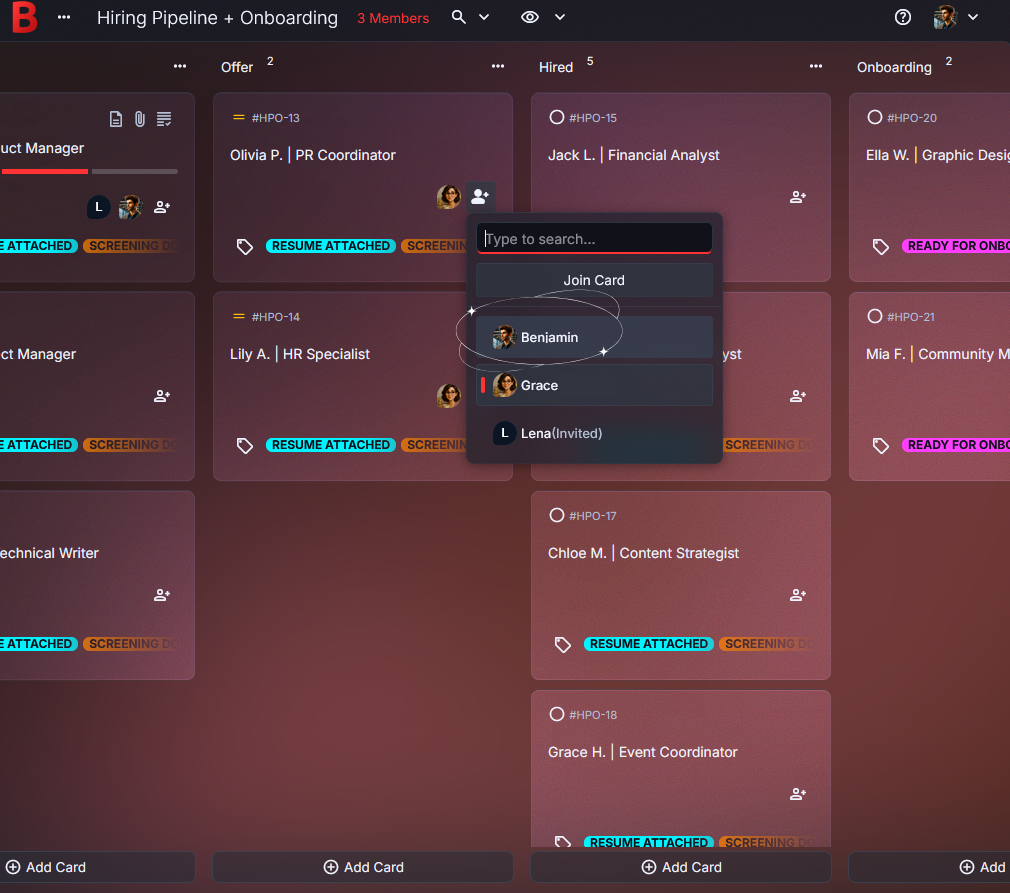
- Assign candidate cards (Team plan) so ownership is obvious
- Add quick comments right after interviews
- Check off onboarding subtasks together once someone is hired
Tips to make your hiring pipeline and onboarding even easier
Use a quick interview recap pattern.”
Keep it consistent and short: “Strength,” “Concern,” “Next step.”
Reviewing candidates later becomes much easier.Tag candidates by source and waiting status.
Try tags like Referral, Inbound, Needs portfolio, or Waiting on reply.
You’ll spot stuck cards faster.Attach the latest resume to the card the moment you receive it.
No more guessing which PDF is the newest version.
It’s right there.Add a small checklist for the Offer stage.
Draft offer, send offer, confirm start date.
That’s enough.Start onboarding the same day you mark someone Hired.
Add first-week subtasks like “order laptop,” “create email account,” and “schedule first 1:1.”
Then Monday morning feels calmer.
Why People Love Using Borddo for hiring + onboarding
A hiring pipeline board that feels lighter to run
There’s relief in knowing where things stand.
Even on a busy day.
Here’s a familiar moment.
You’re in between meetings, a candidate follows up, and you answer quickly because the board shows the last step and the next one.
When they accept, you move the card to Hired and an onboarding checklist is already taking shape inside the same card.
That steadiness reduces mental load.
It’s easier to be present in interviews.
Ready to run your next hire with less confusion?
Build your hiring pipeline board in Borddo, then let it become your onboarding checklist when someone joins.
Set up your candidate tracking board and start today.
Start with one role.
Frequently Asked Questions
A spreadsheet can list names, but it’s harder to feel the flow. With a candidate tracking board, you move people through stages, keep interview notes in comments, and attach resumes directly to each card.
Most small teams start with Applied, Screen, Interview, Offer, Hired, and Onboarding. You can always rename columns or add new ones as your hiring process evolves.
Yes. When someone is hired, move their card into Hired or Onboarding and add subtasks for email setup, equipment, and first meetings. The rest of the board stays focused on hiring.
On the Team plan, you can assign candidate cards so it’s clear who owns the next step. If you’re hiring solo, comments still keep decisions and feedback in one place.
Borddo has a Free plan for a solo user with one board. If you need shared collaboration with assignees, the Team plan is the best fit.