Plan your business workflow the simple, visual way
Running a small business means switching roles constantly. One moment you’re helping a customer, and the next you’re trying to remember whether you updated a supplier note sitting on yesterday’s clipboard. Some days a great idea appears during a rush and disappears before you can write it down. A calm business dashboard board gives you one place to hold everything so your startup task board feels organized instead of scattered.
Turn your small business workflow into something steady, clear, and easy to follow.
It truly helps.
Why managing a small business often feels overwhelming — and how Borddo makes it easier
Running a business seems simple until daily realities start stacking up. You think you logged a customer request, then later realize it never reached your task list. You plan a supplier follow-up but spend too long searching through old messages for the details. Even deciding which task deserves attention first can feel like its own project when nothing lives in one place.
These moments add friction quietly. It isn’t lack of effort. It’s too many scattered tools.
A calm business dashboard board gathers your operations, ideas, and ongoing tasks into one friendly space. Your startup task board becomes a steady anchor through busy days, helping your small business workflow feel manageable.
| Before Borddo | After Borddo |
|---|---|
| 📝Notes scattered across inboxes, voice memos, and notebooks | 📋One business dashboard board for all your moving parts |
| 🔄️Repeated checks to confirm what still needs doing | 👀Clear visibility of tasks, priorities, and responsibilities |
| ⚠️Lost time jumping between apps to find missing details | 🤝A smoother small business workflow you can trust each day |
See your small business workflow come to life on a simple board
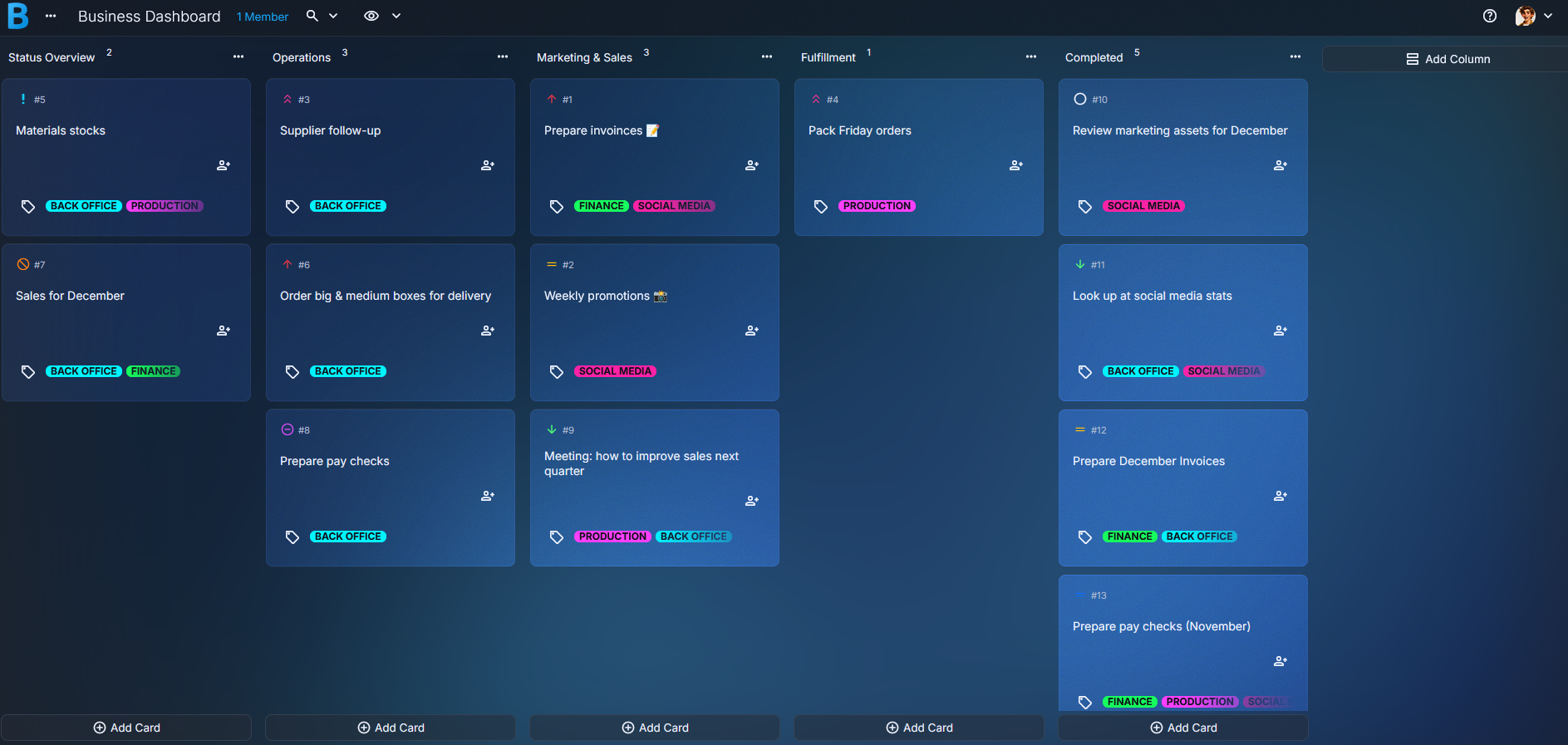
Picture a board where every part of your day has a clear home. Operations stay in one column. Marketing and sales tasks settle in another. Fulfillment steps, customer requests, and admin tasks sit in a calm visual layout you can understand at a glance. It feels grounding.
Cards might include “Prepare weekly invoices,” “Respond to new leads,” “Pack weekend orders,” or “Restock materials.” Inside each card, you can add subtasks like confirming quantities or writing a short caption draft. Tags categorize work into groups like Admin, Sales, Fulfillment, or High Priority. Attachments keep supplier notes, product photos, or draft marketing assets close.
This business dashboard board adjusts easily. Move a card forward after completing an order. Pull a marketing idea into focus when it’s time to act on it. Some days you may reorganize tasks to match the pace of your shop or studio. It stays flexible.
Create your business dashboard board in just a few steps
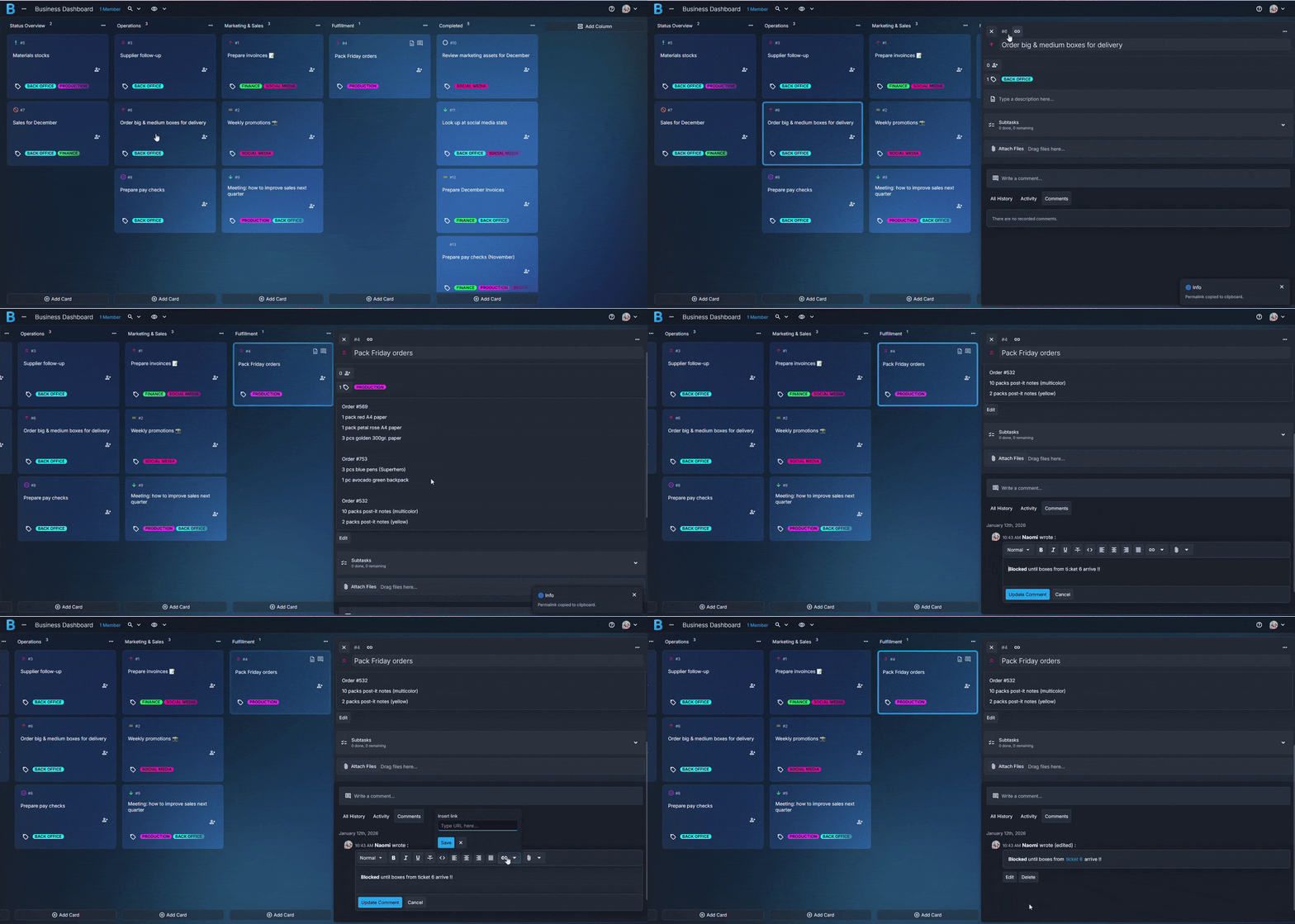
1. Create a new board
Open Borddo, select “New Board,” and name it Business Dashboard or Daily Operations Hub. Simple names are easiest to find during busy days.
2. Add columns that match your workflow
Start with Overview, Operations, Marketing & Sales, Fulfillment, and Completed. Adjust as your small business workflow grows.
3. Add cards for your tasks and projects
Include items like “Send invoices,” “Respond to inquiries,” “Restock packaging,” or “Prepare customer orders.” Short titles help you skim your startup task board quickly.
4. Add checklists, tags, and attachments
Inside each card, outline steps like printing labels or uploading updated images. Tags help categorize tasks. Attach supplier notes, product photos, or draft copy to keep essential information in one place.
5. Move things around as plans change
Shift cards as tasks finish or priorities shift. This flexibility matches the reality of running a small business.
Stay in sync with your team or partners
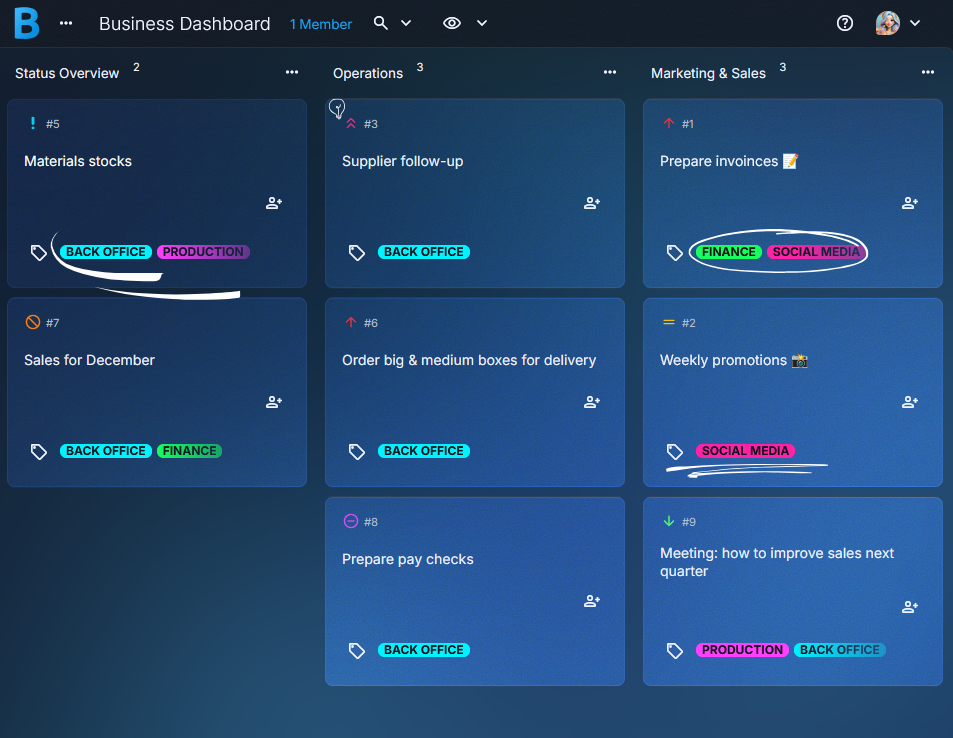
Even small teams gain clarity when everyone shares the same view. With a shared business dashboard board, partners, assistants, or contractors can see what’s active, what’s waiting, and what’s complete. Updates appear the moment someone adds a note or completes a step.
Comments help streamline communication. You might leave a message saying “Orders packed for pickup” or “Supplier confirmed next week’s shipment.” These tiny check-ins cut down on confusion and help your small business workflow stay steady.
It reduces friction. And it lightens your load.
- Share your board
- Real-time visibility
- Quick notes and reminders
- Easy tracking for shared responsibilities
- A unified view of your startup task board
Tips to make your business workflow even easier
Build fulfillment checklists for repeat tasks.
They help ensure steps like labeling and packaging never slip through.
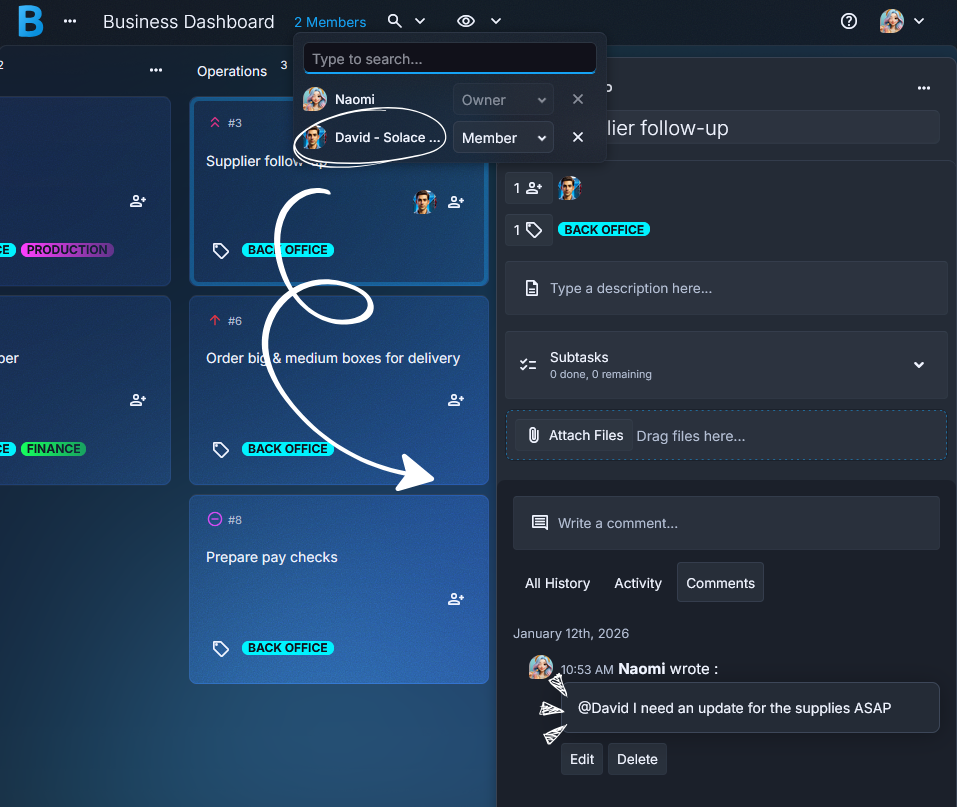
Use tags to group ongoing responsibilities.
Try Admin, Inventory, Sales, or Follow-Up to make your startup task board easier to skim.Attach supplier notes or product files directly to cards.
Keeping everything in one place saves time during busy days.Create an “Ideas to Explore” column.
Marketing ideas or new service concepts have a home until you're ready for them.Add quick summaries when finishing larger tasks.
A short note helps you remember what changed when you revisit a card weeks later.
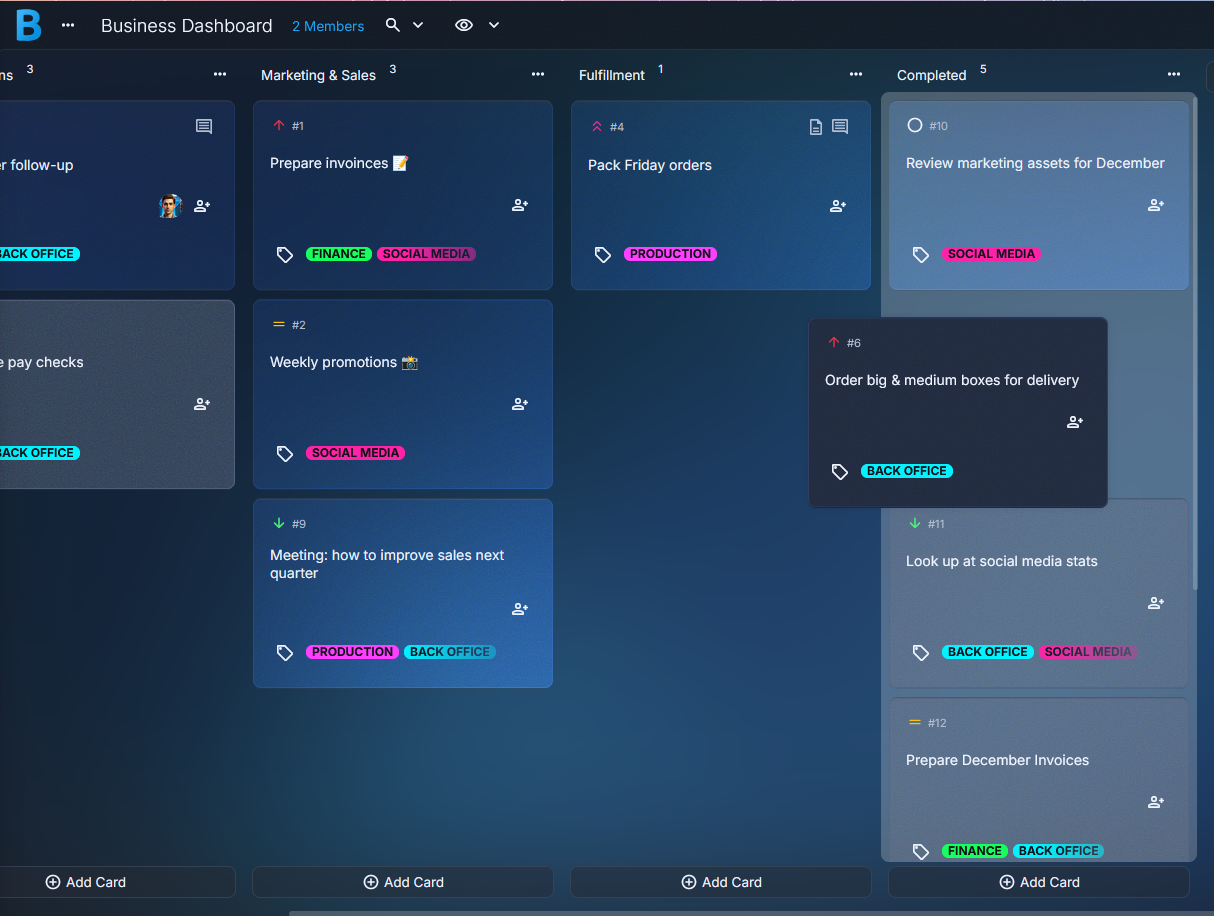
A calmer way to manage your small business
Many small business owners feel more grounded once their business dashboard board holds all their moving pieces. It lightens the mental load and helps you settle into each day with clarity.
Imagine opening your board in the morning and immediately seeing which packages need attention before lunch. Or picture dragging a marketing task into Completed at the end of a long week and feeling that small sense of relief. These moments matter. They build momentum.
Whether you run a studio, a shop, or a service-based business, your startup task board becomes a steady partner in your daily rhythm.
Start your business dashboard board today
Pull your tasks, ideas, and responsibilities into one organized system. It takes only a moment to begin, and your small business workflow will feel clearer the very first time you use it.
Start Your Business Dashboard Board
Frequently Asked Questions
Yes. You can organize operations, marketing, admin tasks, and fulfillment steps in one simple visual layout.
No. Just make a new board and add columns that reflect how your small business workflow naturally runs.
Absolutely. Each card supports attachments so everything stays in one place.
Yes. On collaborative plans, you can invite others to view or update the board in real time.
Yes. Teams can start with a 30-day free trial for up to ten members. This lets you explore shared boards, roles, and collaboration features before choosing a plan.
Yes. Tags help group tasks by Admin, Sales, Inventory, High Priority, and more.